
VALORANT’s Replay System is here.
With the release of Patch 11.06 and the implementation of Replays, we wanted to put together a little overview article to answer some of your burning questions and give you some more detailed info about what to expect from the Replay system at launch.
Let’s jump right in!
Replays were designed as a tool to show a complete view of your recent matches so that you can better understand what happened during a moment, round, or game. We hope that the Replay system allows you to analyze your own play with that of your teammates and opponents to better understand what went right or what went wrong throughout a game.
Now that Replays are live, we will evaluate improvements like we would for any other system in the game. We will continue to listen to player feedback and collect data about how players are interacting with the Replay system before evaluating any possible changes.
Replay System Info
Replays will become available on VALORANT PC starting with Patch 11.06 for all regions other than China.
- Patch 11.06 will deploy on September 16 or 17 depending on your region at 9:00AM PT.
- Replays will be available in China starting with Patch 11.07b on October 9 local China time.
- Replays will be available for VALORANT Console starting with Patch 11.10 on November 11 or 12 depending on your region at 9:00AM PT.
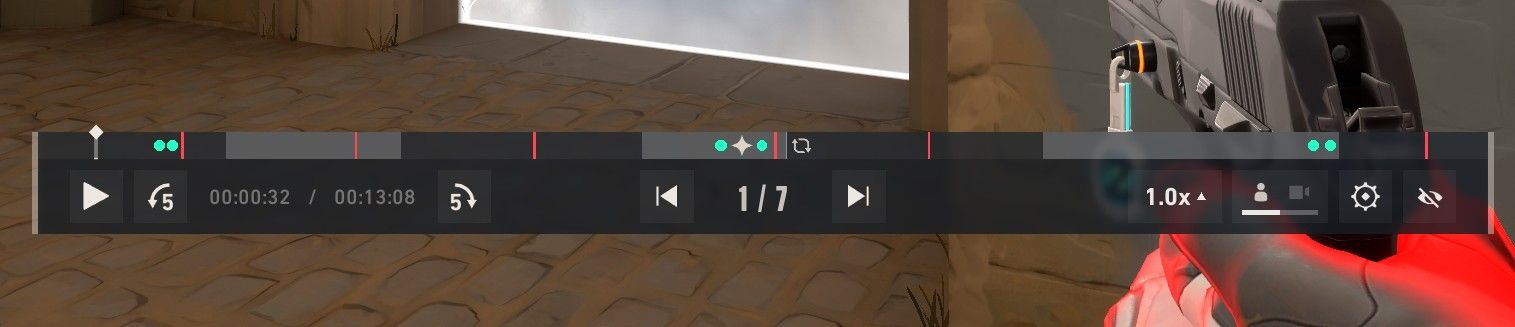
Within a Replay file, you will be able to:
- Observe the game from all 10 players’ first-person perspectives.
- Enable/disable friendly/enemy player outlines, AKA “wall hacks”
- Enable/disable the ability to follow projectiles like Sova Recon Dart.
- Observe the game with a third-person free observer cam
- Fast-forward, slow down, and pause the game. (Speeds: .1x, .25x, .5x, 1x, 2x, 4x, 8x)
- Skip to each round of the game.
- Time-jump to anywhere in the game.
- You’ll also see small icons on the timeline to signify where kills, deaths, and ultimate ability usage took place.
- Show/hide the minimap and HUD.
- Open the combat report at any time
Now, let’s get into some of your Frequently Asked Questions.
General Questions
How do I access my Replays?
After completing a match, you’ll see a new icon to download the Replay file from your match details page or on your Career page. Clicking the Replay icon will download the Replay file and from there you can load you into the Replay.
Will the Replay system impact my game’s performance at all?
No! We’ve worked hard to ensure that the Replay system upholds the best possible gameplay parity between the game you played and the Replay file without impacting your game’s performance.
What game modes have Replay functionality?
Currently, Replays are available for Unrated, Competitive, Swiftplay, and Premier.
Will Replays work for Custom games?
Not right now. Replays don’t currently support Custom games because of the wide range of configuration options they include. As with other Replay features, we’ll keep listening to community feedback as we decide where to focus next.
Why don’t some of my previous games have a Replay option?
Replays are only available for Unrated, Competitive, Swiftplay, and Premier games played on the current live patch. For example, if you played a game on Patch 11.06 and you attempt to view the replay on Patch 11.07, it will not work.
Will I be able to watch Replays of VCT or VALORANT esports matches?
Replays are currently not supported on the tournament realm or in Custom game modes. We will continue to evaluate further use cases like this over time.
Replay Functionality
Does the Replay system record voice and text chat?
No, Replays will not record text or voice chat.
How do I edit settings for Replays?
Check out the new “Viewing” tab in the settings menu for more options.
Are there any Replay clipping/sharing functions?
There are currently no clipping/sharing functions for Replays.
Can I download my Replay files to host or send to another player?
Currently, Replay files can only be downloaded and viewed in your own client for the games you played in.
Why does my Replay perspective look a little different from an OBS recording I captured while playing in a game?
The Replay system is showing you the server’s view of your game. There will be small variances between what you saw on your client and what the Replay saw on the server. This is expected and present in all online games Replay systems.
How does high ping/latency affect a Replay file?
Higher pings on a player’s client can affect what the server saw and cause movement discrepancies. For example, a player with 100+ ms who makes a headshot on their machine can appear to stutter or snap in a Replay file because of the calculations the game server is doing to compensate for that high ping. It can also affect time manipulation in a Replay file and cause delays to time jumping/skipping.
I encountered somebody I believe was cheating in a Replay file, what should I do?
Sometimes due to client and server ping differences during the game, players might appear to move or aim in a way that looks unnatural. This does NOT mean a player is cheating or provide any proof of cheating. If you feel you’ve encountered a cheater, it’s always best to report them during your game for the quickest resolution and a chance at terminating the match.
Known Issues
There are a few known issues with Replays that we also wanted to make you aware of. Some of these issues we’re hoping to fix in a future patch, but others are inherent to Replays in VALORANT and will continue to persist.
Mini/Mega Map Fog of War - While you can toggle enemy outlines on or off to reflect the visual info available to each player’s first-person POV, you cannot hide that info from the minimap or megamap. So even if you can’t see an enemy behind a wall with outlines toggled off, you will still see them on the minimap.
Ability Minimaps - Ability minimaps like Brimstone’s Sky Smoke, Clove’s Ruse, Tejo’s Guided Salvo, Armageddon, etc. will not be viewable in a Replay. From that player’s first-person POV, you will see the Agent raise their hands when placing the abilities, but there will be no in-game map to see exactly where they’re being placed. Once the abilities are deployed, the minimap and in-game world will show the abilities.
Ability Placement Markers - Similar to the ability minimaps above, ability placement markers like KJ’s turret outline, Deadlock’s Sonic Sensor preview, Cypher’s Trapwire preview, etc will also not be viewable when a player is placing them in a Replay. You will see the player equip the ability and the animation when the ability is deployed, but no preview placement markers will be visible until the ability is placed.
We hope you have fun studying, learning, and improving with the Replay system in VALORANT. And we’ll be continuing to monitor your feedback closely as you all use the tool day-to-day. We’ll be back to share more info on our socials at launch, and we’ll continue to update you on any bug-fixes or updates to Replays in the patch notes or additional social content.
GL HF GG!


